Scanamo for hotels
Check-in without a pen. The guest form, filled in from the ID and printed with one tap.
The receptionist scans the ID, picks the room, and the sheet comes out. The guest checks it, signs and goes up to the room.
We show you the app on your own phone, in 20 minutes. The first 30 days are free.
Set it up once. After that, reception just scans.
A tour bus at reception and forty forms to write.
- Groups. Each guest writes their own form, one after another, with the same pen.
- Foreign passports. Names that are hard to copy, letters you don't have on your keyboard.
- Shifts. Each receptionist fills it in differently and skips different fields.
- Incomplete forms. You discover them when someone asks for them.
- The monthly stays report, put together from registers. A day lost at the start of every month.
From ID to key in four steps.
The receptionist scans the ID.
ID card or passport. The details appear on screen, laid out like the form.
They pick the room and the nights.
Arrival is today. Departure is chosen with one tap.
The form comes out of the printer.
By itself or at a tap, whichever you choose.
The guest signs and gets the key.
Scanamo fills in the guest's details from the ID and prints them on your property's document, with no handwriting. Whether the printed document can take the place of the official form depends on your type of property and the rules that apply to it. Check this before you give up the forms you use today.
Made for a busy reception.
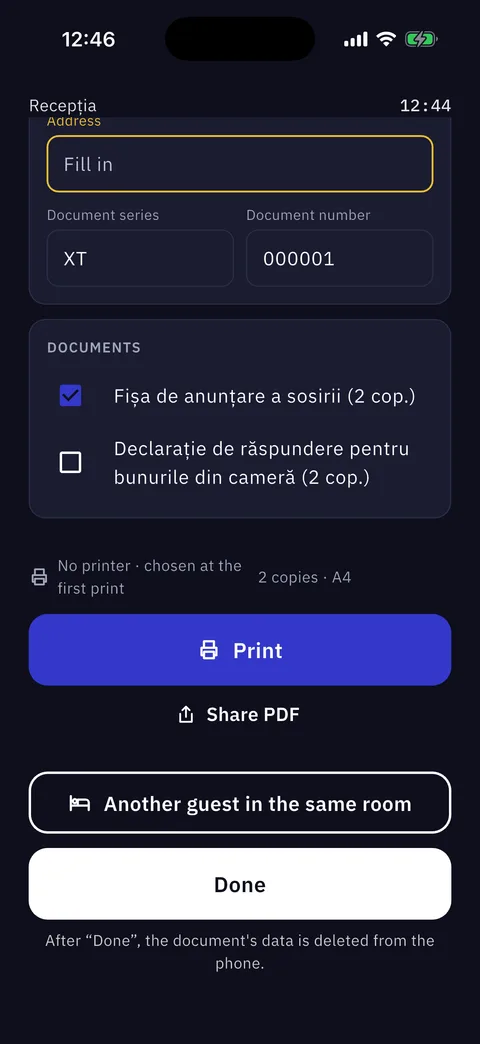
- Another guest in the same room. The room and the dates stay. You just scan the next ID.
- Automatic printing. If you want, the form goes to the printer as soon as the stay details are filled in. You have 3 seconds to cancel.
- Several reception desks. Each phone or tablet has its own printer. Devices are unlimited.
- Each receptionist, with their own PIN. You see how many scans each one did.
- The app, in the receptionist's language. There are 10 languages for each person to choose from.
Your guest's details end up on paper only. We don't keep them.
The form is built on your phone and goes straight to the printer. Once you tap "Done", the name and ID details are wiped from the phone. On our servers, nothing of them remains at all.
What we keep: the room, the arrival and departure dates, country, purpose of trip, age and sex. No names. That's what your statistics and the monthly stays report are built from.
The printed form and its archive stay with you, as they always have.
Your own documents too, filled in from the same ID.
Do you have a damage-deposit agreement, house rules or a key handover record? Paste it into your dashboard and mark where the name, the ID, the room and the dates go. From then on it prints filled in, along with the form.
- Build it yourself. Paste your text, tap "Insert field" and choose: "Name", "ID series and number", "Room", "Arrival date".
- Try it first. Print a test from the app, with made-up data.
- They print together. The form and your documents go to the printer as one job.
- On-screen signing. For your own documents, the guest can sign with a finger on the phone. You print the signed document or send it as a PDF. Scanamo keeps neither the document nor the signature.
- No limits. Your own documents are included on every plan.
The arrival registration form (fișa de anunțare a sosirii) is signed on paper.
The wording of your documents is yours. We don't review it legally.
The monthly stays report, ready at the start of the month.
Scanamo counts arrivals and overnight stays by itself, split into guests from the country your property is in and foreign guests, with foreign guests by country. Open the report, pick the month and you have the figures your monthly reporting asks for.
- Arrivals and overnight stays by country, worked out from your stays.
- Overnight stays at the end of a month are split correctly between months.
- CSV and PDF export.
Scanamo sends nothing anywhere. You use the figures wherever you need them. Check them first.
See how your hotel is doing, in numbers.
- Arrivals and nights, by day and by month.
- Average length of stay.
- Guests' countries and the percentage who are foreign.
- Seasonality: this month against the same month last year. Weekdays against weekends.
- Occupancy, by day, week and month.
- Ages and purpose of trip.
- Who's staying now and who's leaving today.
The statistics about your guests are built from data with no names in it.
Works with the printer you have.
Pair the printer with the phone once, from the app. After that, scan, tap "Print", and the sheet comes out.
- Wi-Fi printers on the same network as the phone.
- Print a test page before your first guest.
- If the printer doesn't respond, send the form as a PDF and print it from a computer.
Set it up once. After that, you just scan.
It's not one more piece of software to learn. It's an app on a phone.
- You set it up once, in under an hour. The account, the location, the staff, the phone.
- After that, you don't have to deal with it. Your employee opens the app, enters a PIN and scans. No account, no password, no email.
- It works on its own. It doesn't connect to your cash register, your booking software or any other system. You install nothing on a computer.
- You open your dashboard only when you want to see the numbers.
It works the same way for…
Anywhere someone still copies the details from an ID onto a form or a contract by hand.
See everything document filling does
Don't see yourself here? If you work with ID documents, it probably fits you too. Get in touch.
Pricing for hotels
You pay for the number of scans. Rooms, phones, staff and your own documents are unlimited.
Start
$21.99 / month + VAT
200 scans a month
Guesthouses with up to about 10 rooms, small agencies and rental businesses.
- Your documents (contract, house rules, handover record), filled in from the ID and printed
- Unlimited own documents, which you build yourself in the dashboard
- On-screen signing for your own documents
- For accommodation: the arrival registration form (fișa de anunțare a sosirii), with the details read from the ID
- For accommodation: the monthly arrivals and overnight stays report
- Statistics that fit your business
- Unlimited locations, phones and staff
- Email support
Pro
Over ~7 IDs a day$54.99 / month + VAT
1,000 scans a month
Hotels with up to about 50 rooms, companies with many contracts.
- Everything in Start
- The same features, five times the scans each month
Custom
Contact us
More than 1,000 scans a month
Large hotels, chains.
- Everything in Pro
- A scan allowance and a price we agree together
Prices exclude VAT. 30 days free, up to 100 scans. No card to sign up. One scan is one guest read from an ID. Forms filled in by hand don't count. See all pricing
Frequently asked questions
Does it connect to my booking software?
No. Scanamo works on its own, on a phone or tablet. You pick the room from a list you set up once, in your dashboard. If you want a link to your software, write to us under Custom development.
A group of 40 people arrives. How long does it take?
As long as it takes to scan the IDs. For guests in the same room you keep the room and the dates and just scan the next ID.
I have 120 rooms. Which plan do I take?
The plan depends on how many guests you scan a month, not on rooms. Pro has 1,000 scans. Above that, choose Custom.
I have several hotels. Do I need several accounts?
No. You add them as locations in the same account, with statistics and a monthly stays report for each.
Can the guest sign on the tablet?
Your own documents (house rules, contract), yes. The arrival registration form (fișa de anunțare a sosirii) is signed on paper.
See all questions
What if the ID has no address on it?
Newer electronic ID cards and passports don't have the address printed on them. The field prints as a dotted line on the form and the guest writes it in, or you type it in the app before printing. The same goes for place of birth, which the app doesn't read from the ID.
Which printers work?
Wi-Fi printers on the same network as the phone. You pair one once, from the app, and print a test page.
What if the internet goes down?
Tap "Fill in by hand". The form prints with your property's details, the room and the dates, and the guest writes in their own details by hand. The arrival is recorded when the connection comes back. Forms filled in by hand don't use up your scans.
Does it work with foreign passports?
Yes. The app reads foreign passports and ID cards. The guest's country is filled in from the ID by itself and you can change it.
What data do you keep about guests?
No names, no ID numbers, no photos. We keep the room, the arrival and departure dates, country, age, sex and purpose of trip. The name appears only on the printed form, which stays with you.
A family arrives with children. What do I do?
Scan the first ID, then tap "Another guest in the same room" for each of the others. For a child with no ID, tap "Fill in by hand". If the guest is a minor, the app reminds you that minors can only stay when accompanied.
Can I reprint a form?
Yes, as long as the form is still open on screen. Once you tap "Done", the guest's details are wiped from the phone and can't be brought back. The app tells you so first.
A guest leaves early or stays an extra night. What do I do?
Open the "Staying now" list and change the departure date. Your statistics and the monthly report correct themselves. On the paper form you correct it by hand, as you do today.
Do I need a computer at reception?
No. You scan and print from a phone or tablet. Setup is done once, in the dashboard, and the dashboard works from a phone too.
Want to talk first?
Tell us what business you run and we'll show you how it works for you.
We show you the app on your own phone, in 20 minutes. The first 30 days are free.