Scanamo for equipment rentals
The rental contract, filled in from the ID card while the customer picks their equipment.
Scan the ID, enter the deposit, print. Skis, bikes, tools, anything you hand over under a contract.
We show you the app on your own phone, in 20 minutes. The first 30 days are free.
Set it up once. After that, the person at the counter just scans.
Morning, at the counter: ten people and one pen.
- The contract is written by hand. For every customer, the same lines.
- A line exactly when you're busiest. Customers want to get going, not fill in sheets.
- Wrong series and number. You find out when the equipment doesn't come back.
- ID cards held as a deposit, or photographed. Data you don't want to be responsible for.
- Seasonal staff. Each one fills in the contract their own way.
Scan, enter the deposit, print.
Scan the customer's ID.
The name, series and number appear in the contract in about 2 seconds.
Fill in what belongs to the rental.
The fields you added yourself: the deposit, what they took, until when.
Print.
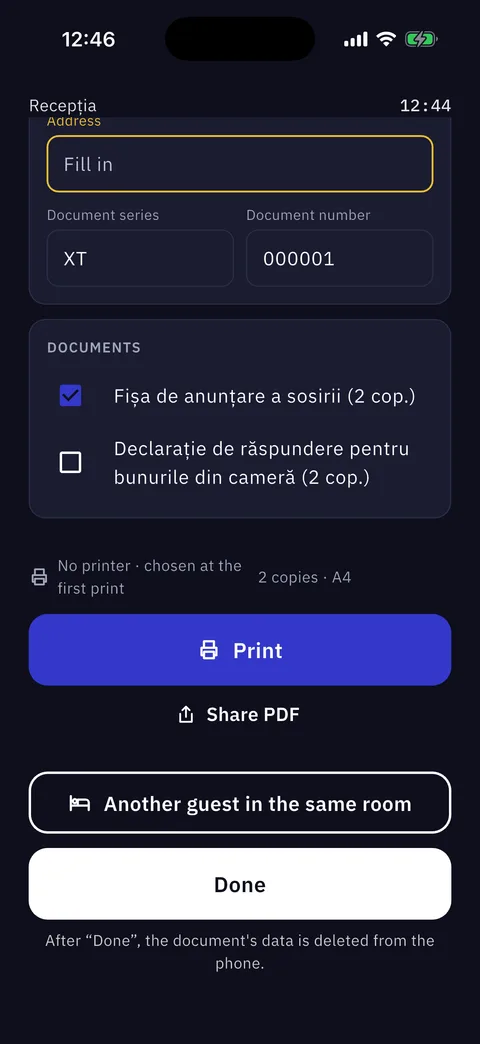
The contract and the handover record come out together, in as many copies as you chose.
The customer signs.
On paper or with a finger, on screen.
Your contract, with your fields.
Paste into your dashboard the contract you already use. Mark where the details from the ID go and add the fields you fill in at the counter.
- Fields filled in at print time: "Deposit (lei)" and any other field you need.
- Several documents from one scan: contract, handover record, rules.
- As many copies as you want: one for you, one for the customer.
- On-screen signing and PDF, if you don't want paper.
Scanamo fills in and prints the contract. It doesn't keep track of equipment and it doesn't keep customers' names. Who took what is written on your contract.
Build your documents yourself, in your dashboard.
Paste in the text of your document and mark where the name, the ID and the other details go. From then on it prints filled in, for every customer.
- Build it yourself. Paste your text, tap "Insert field" and choose: "Name", "ID series and number", "Date of birth".
- Add fields to fill in at print time, too. For example "Deposit (lei)". Your employee types the amount before printing.
- Try it first. Print a test from the app, with made-up data.
- Made a mistake? Go back to the previous version with one button.
- No limits. Your own documents are included on every plan.
- Would you rather send it to us? We'll build it for you.
The wording of your documents is yours. We don't review it legally.
For now, documents are text only: no logo and no images.
The customer can sign with a finger, on the phone.
For each signature line in your documents you choose: on paper or on screen. You print the signed document or send it as a PDF, by email or WhatsApp.
- The signature appears in the document, in its place.
- Scanamo keeps neither the signed document nor the signature. Keeping it is up to you: on paper or as a PDF.
- If you close without printing or sending, the app warns you first.
Your customer's details end up on paper only. We don't keep them.
The document is built on your phone and goes straight to the printer. Once you tap "Done", the name and ID details are wiped from the phone. On our servers, nothing of them remains at all.
The printed document and its archive stay with you, as they always have.
Works with the printer you have.
Pair the printer with the phone once, from the app. After that, scan, tap "Print", and the sheet comes out.
- Wi-Fi printers on the same network as the phone.
- Print a test page before your first customer.
- If the printer doesn't respond, send the document as a PDF and print it from a computer.
See how much work you do, in numbers.
- Customers scanned, by day and by hour, with the peak hour.
- Documents printed, for each document.
- Each employee: how many scans they did.
- Ages and nationalities.
- For accommodation, in addition: arrivals, nights, average length of stay, guests' countries, occupancy.
The statistics about your customers are built from data with no names in it.
Set it up once. After that, you just scan.
It's not one more piece of software to learn. It's an app on a phone.
- You set it up once, in under an hour. The account, the location, the staff, the phone.
- After that, you don't have to deal with it. Your employee opens the app, enters a PIN and scans. No account, no password, no email.
- It works on its own. It doesn't connect to your cash register, your booking software or any other system. You install nothing on a computer.
- You open your dashboard only when you want to see the numbers.
It works the same way for…
Anywhere someone still copies the details from an ID onto a form or a contract by hand.
See everything document filling does
Don't see yourself here? If you work with ID documents, it probably fits you too. Get in touch.
Pricing for rentals
You pay for the number of scans. Locations, phones, staff and your own documents are unlimited.
Start
$21.99 / month + VAT
200 scans a month
Guesthouses with up to about 10 rooms, small agencies and rental businesses.
- Your documents (contract, house rules, handover record), filled in from the ID and printed
- Unlimited own documents, which you build yourself in the dashboard
- On-screen signing for your own documents
- Statistics that fit your business
- Unlimited locations, phones and staff
- Email support
Pro
Over ~7 IDs a day$54.99 / month + VAT
1,000 scans a month
Hotels with up to about 50 rooms, companies with many contracts.
- Everything in Start
- The same features, five times the scans each month
Custom
Contact us
More than 1,000 scans a month
Large hotels, chains.
- Everything in Pro
- A scan allowance and a price we agree together
Prices exclude VAT. 30 days free, up to 100 scans. No card to sign up. One scan is one ID read. Documents filled in by hand don't count. See all pricing
Frequently asked questions
Can I see in the app who hasn't returned their equipment?
No. Scanamo keeps no names and doesn't keep track of equipment. That stays on the printed contract or in the PDF you keep.
Can I put the personal numeric code (CNP) in the contract?
Not on your own. The CNP isn't in the list of fields you choose from. If you need it in the contract, write to us, we record the legal basis and we add it ourselves.
I rent out cars. Does it work?
The contract is filled in from an ID card or passport, as with any rental. The app doesn't yet read the categories and their validity from a driver's license, so you enter those by hand.
The customer is a minor. What happens?
The app blocks nothing for documents. If the ID has expired, it warns you. You make the rule for minors.
I work only in season. Do I pay all year?
No. The subscription is monthly. At the end of the season you simply don't pay the next month.
See all questions
I have several rental points.
Add them all to the same account. Locations, phones and staff are unlimited.
Which documents can I print?
Any document made of text: a contract, a handover record, a set of rules, a declaration.
What data do you keep about my customers?
No names, no ID numbers, no photos. We keep age, sex, nationality and the time of the scan, and for accommodation the room, the dates and the purpose of the trip. The name appears only on the printed document, which stays with you. The full list is under Security & GDPR.
Can I reprint a document?
Yes, as long as it's still open on screen. Once you tap "Done", the customer's details are wiped from the phone and can't be brought back. The app tells you so first.
What if the ID has no address on it?
Newer electronic ID cards and passports don't have the address printed on them. The field prints as a dotted line and the customer writes it in, or you type it in the app before printing.
What if the internet goes down?
Tap "Fill in by hand". The document prints with your company's details, and the customer writes in their own details by hand. Documents filled in by hand don't use up your scans.
Can I use my own PDF, with my company logo?
Not yet. Documents are built from text, in your dashboard: a title, a header with your company's details, paragraphs, fields and signature lines. If you need more, write to us under Custom development.
Which printers work?
Wi-Fi printers on the same network as the phone. You pair one once, from the app, and print a test page.
Do I need a computer?
No. You scan and print from a phone or tablet. Setup is done once, in the dashboard, and the dashboard works from a phone too.
Do my staff need an account or an email address?
No. They open the app, enter the PIN and scan.
How do I pay?
Monthly, by bank transfer, on the invoice we email you. The first 30 days are free, up to 100 scans. If you stop, you simply don't pay again: your account stops at the end of the month you paid for.
Want to talk first?
Tell us what business you run and we'll show you how it works for you.
We show you the app on your own phone, in 20 minutes. The first 30 days are free.