Scanamo for alcohol and tobacco shops
Can they buy it? The cashier knows in about 2 seconds.
One phone next to the checkout. The cashier scans the ID card, and the screen goes green or red.
We show you the app on your own phone, in 20 minutes. The first 30 days are free.
Set it up once. After that, your cashiers just scan.
Your cashier decides alone, with a line behind the customer.
- The birth-year sum, done in a hurry. With five people in line.
- The customer argues. "I'm 18, I just don't have my ID on me."
- New cashiers, every month. Each one applies the rule as they see fit.
- Evenings and weekends are the hardest. That's when the youngest customers buy.
- The fine comes in the name of the shop. Not of the cashier.
Ask for the ID card. Scan. Sell or don't.
The cashier asks for the ID card and scans it.
With the phone next to the checkout. The photo takes itself.
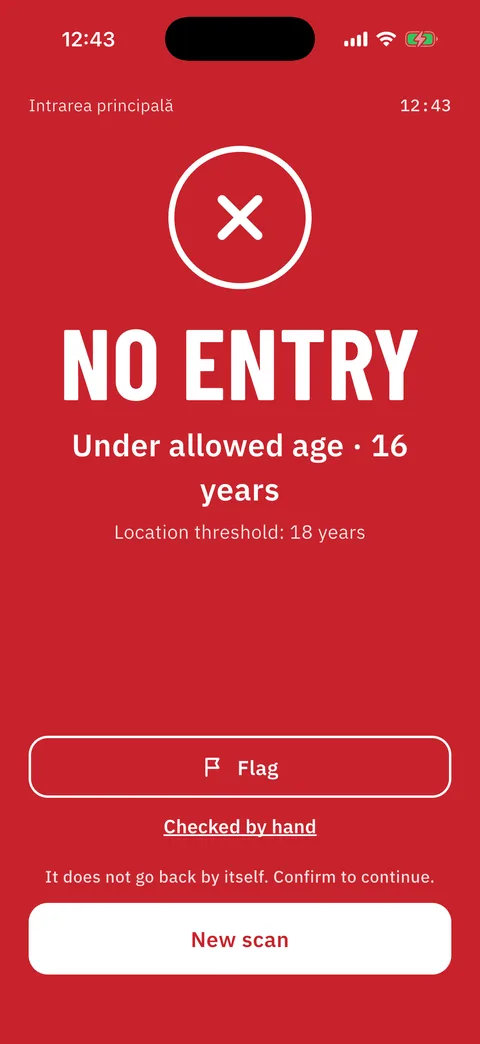
The screen gives the verdict.
Green: old enough. Red: not old enough, or the ID has expired.
The cashier sells or refuses.
They show the customer the screen. It's no longer their opinion, it's the date on the ID.
You see the numbers.
Checks per hour, how many refused, for each checkout and each cashier.
It doesn't touch the cash register.
Scanamo is an app on a phone. It doesn't connect to the cash register, the stock software or the scales. You don't call anyone in to install anything.
- One phone or tablet next to each checkout. The screen says "Checkout 1", "Checkout 2".
- The cashier has no account or password. They enter a PIN at the start of the shift.
- Got several shops? Add them all to the same account, at no extra cost.
Four colors. Nothing to interpret.
- GREEN
- Old enough, and the ID hasn't expired.
- CAUTION
- The ID is fine, but this person was flagged recently at another scan point. It appears only if you have flags switched on. Your employee decides.
- RED
- Under the required age, expired ID, or a person you have banned. The reason is on screen.
- RESCAN
- The photo couldn't be read. Take another.
You set the minimum age, for each location. It starts from the usual value in your country (18 in Romania) and you can change it anytime.
Scanamo checks age and the ID's expiry date. It does not check whether the ID is genuine.
See how it went without having been there.
Open your dashboard and the numbers are there, by day, by week or by location.
- Checks per hour and the peak hour.
- Passed and refused, with the reasons: underage, expired ID, banned.
- Ages: mean, median and age groups.
- Men and women. Nationalities.
- Each employee: how many scans they did and how fast they work.
- Comparisons: this week against last week, one location against another.
You choose the time your working day starts. That way a night that runs past midnight stays one day in your statistics.
Set it up once. After that, you just scan.
It's not one more piece of software to learn. It's an app on a phone.
- You set it up once, in under an hour. The account, the location, the staff, the phone.
- After that, you don't have to deal with it. Your employee opens the app, enters a PIN and scans. No account, no password, no email.
- It works on its own. It doesn't connect to your cash register, your booking software or any other system. You install nothing on a computer.
- You open your dashboard only when you want to see the numbers.
It works the same way for…
The same app, the same verdict. Only the words on the screen change.
See everything the age check does
Don't see yourself here? If you work with ID documents, it probably fits you too. Get in touch.
Pricing for shops
You pay for the number of scans. Shops, checkouts and cashiers are unlimited.
Start
$54.99 / month + VAT
1,000 scans a month
Bars, shops and small clubs open a few nights a week.
- Full-screen verdict: GREEN, CAUTION, RED, RESCAN
- A minimum age you choose, for each location
- Flags and bans, visible at every scan point (switch them on if you need them)
- Statistics: peak hours, ages, refusals
- Unlimited locations, phones and staff
- Report exports (CSV, PDF)
- Email support
Pro
Over ~33 IDs a day$139.99 / month + VAT
5,000 scans a month
Clubs with a full schedule, high-traffic shops.
- Everything in Start
- The same features, five times the scans each month
Custom
Contact us
More than 5,000 scans a month
Large clubs, festivals, chains.
- Everything in Pro
- A scan allowance and a price we agree together
Prices exclude VAT. 30 days free, up to 100 scans. No card to sign up. See all pricing
Frequently asked questions
Does it connect to the cash register?
No. The check is done on the phone, separately from the receipt. The cashier scans the ID, sees the verdict and then sells as usual.
Do I have to scan every customer who buys alcohol or cigarettes?
You make the rule. Many ask for ID only from those who look too young. Scanamo gives the answer fast, every time the cashier asks.
What does the cashier see about the customer?
Only the age and the verdict, unless you've switched on the Documents feature. The name, the address and the personal numeric code (CNP) never reach their phone.
The customer refuses to hand over the ID. What do I do?
What you do today: you don't sell. Scanamo doesn't change the rule, it just takes the sum out of the cashier's hands.
I have a chain of shops. How do I set it up?
All the shops sit in the same account, with statistics for each. If you go over 5,000 scans a month, choose Custom and we agree the allowance and the price together.
See all questions
Can I keep a list of people I no longer sell to?
Yes, if you switch on flags and bans from the dashboard. For shops they come switched off.
What does Scanamo check, and what doesn't it check?
It reads the ID and checks two things: age and expiry date. If you have flags switched on, it also looks the person up in your list. It does not check whether the ID is genuine. A well-made fake can come up green, so your employee still looks at the ID and at the person.
What data do you keep about my customers?
We don't keep the ID photo, the name or the CNP. We keep, with no names, age, sex, nationality, time and verdict, which is what your statistics are built from, plus a few technical details about the scan. The full list is under Security & GDPR. Unless you've switched on the Documents feature, your employee sees only the age and the verdict on the phone.
Do I have to tell people I'm scanning their ID?
Yes. Your dashboard gives you a notice filled in with your company's details. Print it and put it where people can see it, at the entrance or at the checkout. You accept the data processing agreement online, when you sign up.
Can I set an age other than 18?
Yes. You set the minimum age, for each location, and you can change it anytime from the dashboard.
Can I print documents from the ID too, a declaration for example?
Yes, if you switch on the Documents feature from the dashboard. First you accept its annex to the data processing agreement. While the document is open, the details from the ID that the document needs reach your employee's phone. After "Done", they're wiped from the phone.
Does it work without internet?
No. Scanning needs a connection, mobile data or Wi-Fi. If the signal drops, the app tells you right away. Check the ID by eye and tap "Checked manually" so the check still shows up in your statistics. Manual checks don't use up your scans.
Which IDs can it read?
ID cards, passports and driver's licenses, Romanian and foreign. For newer ID cards the app asks for the back as well.
What if an ID can't be read?
Take another photo, with no glare and the whole ID in frame. After three tries the app offers "Checked manually". Retakes don't use up your scans.
Does it connect to the cash register or to other software?
No, and it doesn't need to. It's an app on a phone that works on its own. Your employee scans, sees the verdict and gets on with the job.
Do my staff need an account or an email address?
No. You add their names in the dashboard and they get a PIN. They open the app, enter the PIN and scan. Several employees can share one phone, each with their own PIN.
What phone do I need?
Any iPhone or iPad on iOS 15 or later. Any Android phone or tablet on Android 8.0 or later with Google services. The rear camera needs autofocus.
How do I pay?
Monthly, by bank transfer, on the invoice we email you. The first 30 days are free, up to 100 scans. If you stop, you simply don't pay again: your account stops at the end of the month you paid for.
What happens if I run out of scans during opening hours?
Scanning doesn't stop on the spot. It keeps working until the next 12:00 noon, local time, or until the start of your working day, if that starts after noon. You get an email, and if you write to us from your dashboard we move you to the next plan. The one exception is a safety cap: if more than 2,000 scans are made after you reach the limit, scanning stops straight away. We don't charge for extra scans.
Want to talk first?
Tell us what business you run and we'll show you how it works for you.
We show you the app on your own phone, in 20 minutes. The first 30 days are free.