Scanamo for office buildings
Reception knows who went up, to see whom, and whether they've left.
Scan the visitor's ID, pick the company or the person they're going to, and the visitor slip comes out of the printer. No notebook on the desk.
We show you the app on your own phone, in 20 minutes. The first 30 days are free.
Set it up once. After that, reception just scans.
The notebook on the reception desk is read by everyone who signs it.
- Yesterday's visitors' names and IDs, in plain view. For every one of today's visitors.
- Ten companies in the building. Nobody knows how many visitors each one had.
- The exit isn't written down. At 6 pm, the notebook shows a full building.
- In an evacuation drill you count people without knowing how many there should be.
- Couriers, job candidates, technicians. All on the same page, in no order at all.
Scan, pick the company, print. When they leave, tap the number.
Reception scans the ID.
The details appear on screen in about 2 seconds.
They pick who the visitor is going to.
A company in the building, a department or a person, from your list.
The visitor slip comes out.
With its number, which reception also sees on screen.
When they leave, the visitor hands in the slip.
Reception taps its number and the visit closes.
See who gets visitors, and when.
You make the list of hosts: the companies in the building, departments or people. Your dashboard then shows the visitors for each host and each purpose.
- By host: how many visitors each company or department had.
- By purpose: meetings, deliveries, maintenance, interviews. You change the list.
- By hour: when reception is busy.
- CSV export, with no names.
We recommend adding companies or departments as hosts, not people's names, wherever that's enough.
Know at any moment how many visitors you have in the building.
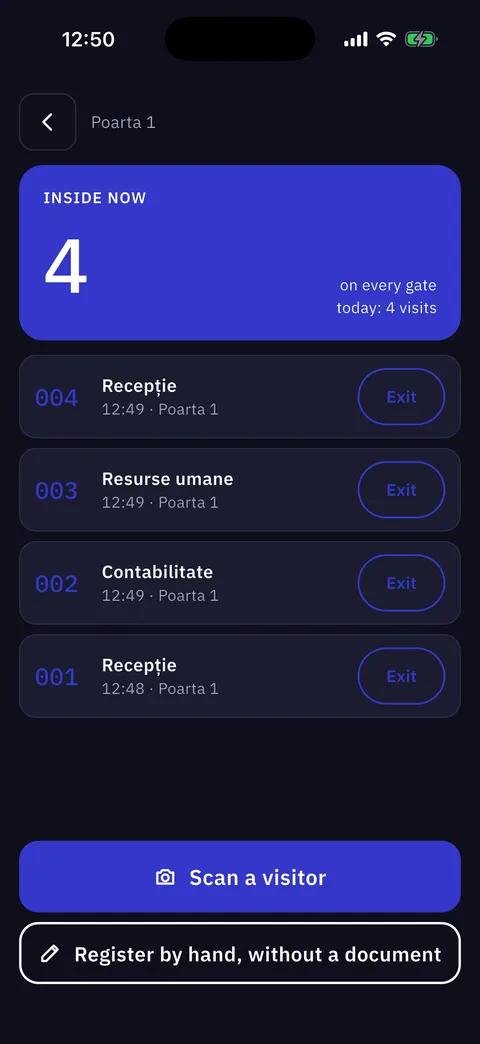
The guard's screen says in large type: "Inside now: 12". Tap it and you see every open visit: slip number, entry time, host and the gate they came in through. You have the same list in your dashboard, for all gates.
- In an evacuation you know how many visitors have to be counted and who they were visiting. The names are on the slips at the gate.
- Several gates. Someone who came in through Gate 1 can leave through Gate 2.
- No names on screen. The list shows slip numbers, not people.
The visitor's name ends up only on the printed slip, which stays with you.
About the visit we keep the entry and exit times, the gate, the host, the purpose and the slip number, plus a few details with no names, for statistics (age, sex, nationality). No name and no ID number. You can link a visit to your slip by number and time, so the law calls this pseudonymised data, and we protect it as personal data. The name and the ID series and number appear on the guard's screen and on paper. After "Done", they're wiped from the phone.
The register with names is your stack of slips, kept in order and out of sight. The numbers and the times are in your dashboard.
To recognize the person when you scan their ID on the way out, the app holds a code that the personal numeric code (CNP) can't be recovered from. The code is deleted at exit and, in any case, within 24 hours at most. The exception: if you've switched on access bans, the code of a person with a ban is kept until the ban expires (12 months at most).
The slip comes ready-made. You can replace it with your own.
The visitor slip has the name, the ID, the company, the host, the time, the slip number and the visitor's signature. If you want a different one, you build it yourself in your dashboard, for example with the health and safety rules the visitor signs.
- It prints on an ordinary printer: A4, A5 or two slips on one A4 sheet.
- Wi-Fi printers on the same network as the phone. You pair one once.
- You can switch printing off entirely. The guard still sees the visitor's name on screen while recording the entry, but the name isn't written down anywhere. You keep the entries, the exits and the numbers, with no names.
Numbers the notebook doesn't give you.
- Visitors per day and per hour, with the peak hour.
- How long a visit lasts: mean and median.
- Who they visit and why: by host or department, and by purpose.
- Visits with no exit. See at which gate and with which guard the exit gets forgotten.
- The list of visits, with no names, with filters by day, host and purpose. CSV export.
What it doesn't do yet. We say so up front.
- Badges on label printers. For now, the slip prints on an ordinary printer.
- Visitors announced in advance. The visit is recorded when the person reaches the gate.
- Search by name. Names don't reach us, so there's no way to look a person up in the dashboard. You find them in your slips.
- Staff time and attendance. Scanamo keeps track of visitors, not of your own people.
Set it up once. After that, you just scan.
It's not one more piece of software to learn. It's an app on a phone.
- You set it up once, in under an hour. The account, the location, the staff, the phone.
- After that, you don't have to deal with it. The guard opens the app, enters a PIN and scans. No account, no password, no email.
- It works on its own. It doesn't connect to your cash register, your booking software or any other system. You install nothing on a computer.
- You open your dashboard only when you want to see the numbers.
It works the same way for…
Anywhere there's still a notebook at the gate or at reception.
See everything the visitor log does
Don't see yourself here? If you work with ID documents, it probably fits you too. Get in touch.
Pricing for office buildings
You pay for the number of scans. Gates, phones and staff are unlimited.
Start
$32.99 / month + VAT
500 scans a month
One building or one construction site, with up to about 25 visitors a day.
- Every visitor's entry and exit, with the time
- The visitor slip, filled in from the ID and printed
- "Inside now", on the guard's phone and in your dashboard
- Your own visitor slip, with your own rules, if you want a different one
- Statistics: visitors per day and per hour, length of visits, hosts
- Unlimited gates, phones and staff
- Email support
Pro
Over ~17 IDs a day$87.99 / month + VAT
2,500 scans a month
Factories, large buildings, several gates.
- Everything in Start
- The same features, five times the scans each month
Custom
Contact us
More than 2,500 scans a month
Industrial parks, chains.
- Everything in Pro
- A scan allowance and a price we agree together
Prices exclude VAT. 30 days free, up to 100 scans. No card to sign up. One scan is one ID read. Exits by slip number and manually registered entries don't count. See all pricing
Frequently asked questions
Is the host notified when their visitor arrives?
No. The app records the visit and prints the slip. Notifying the host stays with reception, as it does today.
Can I announce a visitor in advance, so they're expected?
Not yet. The visit is recorded when the person reaches reception.
Can we print sticker badges?
Not yet. The slip prints on an ordinary printer, on A4 or A5. The slip number stands in for a badge number.
We have a reception on the ground floor and one at the parking entrance.
Each has its own phone or tablet. The "Inside now" list is shared, and someone who came in through one can leave through the other.
A contractor comes in every day. Does the app recognize them?
Not from one day to the next. Names don't reach us, so each day is a new visit, with its own slip.
See all questions
Does it work on a tablet, at reception?
Yes. The app runs on iPad and on Android tablets, with the screen held upright.
What data do you keep about visitors?
No names, no ID numbers, no photos. We keep the entry and exit times, the host, the purpose, the slip number and the gate, plus age, sex and nationality, with no names. The name is only on the printed slip, which stays with you.
Do I have to tell visitors I'm scanning their ID?
Yes. Your dashboard gives you a notice for the gate or reception, filled in with your company's details.
What if the visitor has no ID?
Tap "Register manually". You pick the host and the purpose, and the slip is filled in by hand. The visit shows up in the list and in the numbers like any other and doesn't use up your scans.
How do I record the exit?
In three ways. Tap the slip number in the "Inside now" list: it's the fastest and doesn't use a scan. Or scan the ID again and the app offers the exit; that counts as one scan. If nobody does anything, the visit closes by itself the next day, marked "no exit".
The visitor lost the slip. What do I do?
Scan their ID when they leave, or pick them from the list, by time and host.
I have several gates. Does it work?
Yes. Each gate has its own phone. The "Inside now" list is shared, and a visit opened at one gate can be closed at another. Gates and phones are unlimited.
What printer do I need?
An ordinary Wi-Fi printer, on the same network as the phone. The slip prints on A4, on A5 or two to an A4 sheet. Badges on label printers aren't available yet.
Can I ban someone from entering?
Yes, if you switch on access bans from the dashboard. When the ID is scanned, the guard sees "Access denied", with the reason. A ban lasts 30 days unless you choose otherwise, and 12 months at most; you can extend it before it expires. The feature comes switched off.
Can I search for a visitor by name?
Not in Scanamo. Names don't reach us. You find the person in your printed slips, by day and slip number.
Does it work without internet?
No. Scanning the ID needs a connection, mobile data or Wi-Fi.
Does the guard need an account or an email address?
No. They open the app, enter the PIN and scan.
Want to talk first?
Tell us what business you run and we'll show you how it works for you.
We show you the app on your own phone, in 20 minutes. The first 30 days are free.